
 Mainframe Tutorial
 JCL Tutorial
 Introduction
 Mainframe Interview Q&A
 Mainframe Quiz
 Mainframe Memes
 Contact us
 About us
Module 11: CICS Error Handling and Debugging
 Backward

CICS Error Handling
Every CICS command can fail at run time. A file may not be open, a record may not exist, or a map may be missing. If the program does not plan for these situations, the task ends with an abend and the user sees an ugly error screen. CICS gives the programmer four simple ways to catch these problems and handle them gracefully.
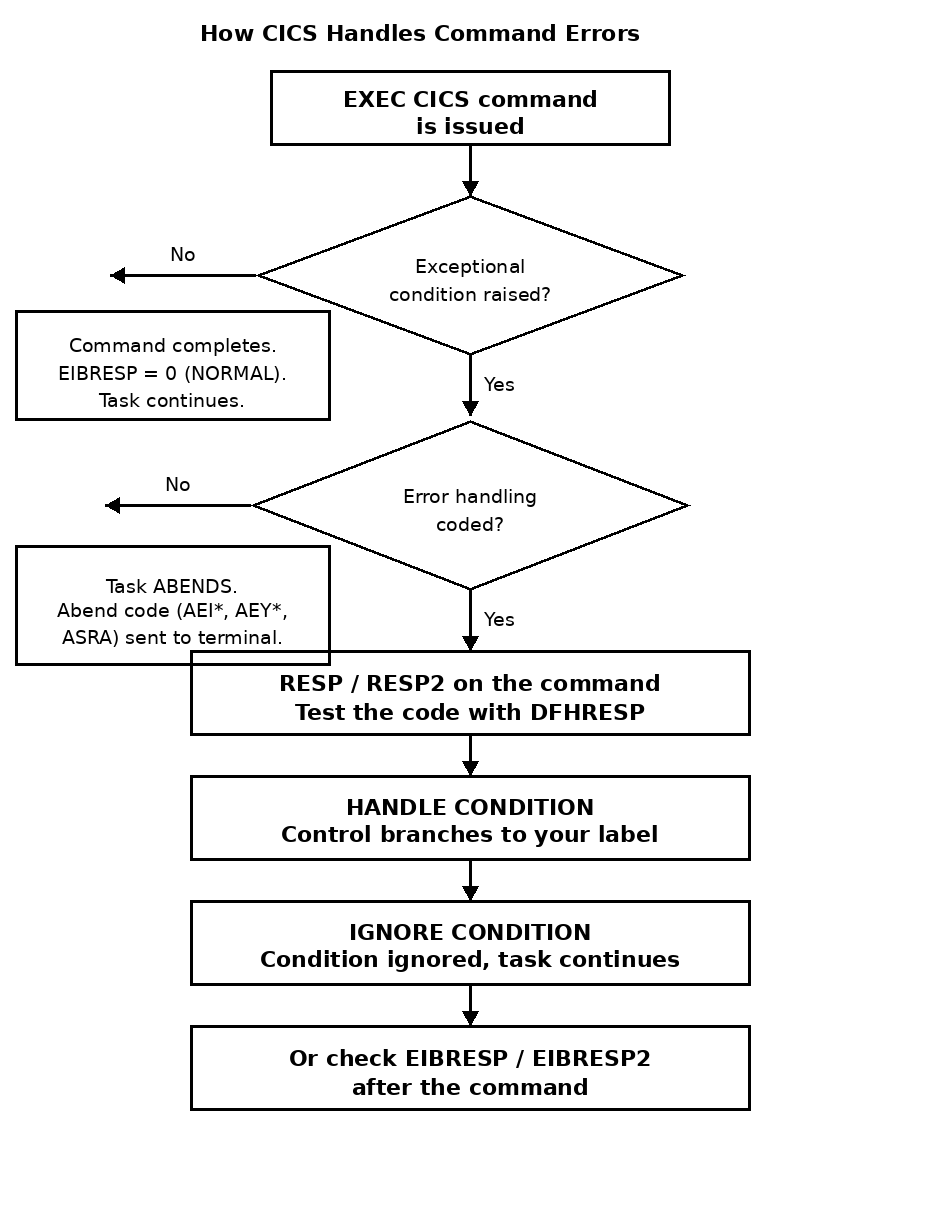
Exceptional conditions and abends
- An exceptional condition is an unusual but expected situation, such as record NOTFND, file NOTOPEN, or end of file (ENDFILE).
- If a CICS command raises a condition and the program has no handling for it, CICS abends the task with a condition code like AEIM (NOTFND) or AEIT (ENDFILE).
- A program check abend is different: the program tried an operation the hardware does not allow, for example dividing by zero or using a bad address. This always ends with abend code ASRA.
- Good CICS programs expect the exceptional conditions and check for them after every command that can fail.
The four error-handling techniques
- RESP / RESP2 - coded on the individual command. CICS puts a response code in your variable instead of abending the task. You test the value with DFHRESP.
- HANDLE CONDITION - coded once in the program. When any later command raises a listed condition, control branches to your label. It stays active for the rest of the task.
- IGNORE CONDITION - coded once. The listed conditions are simply ignored when they occur. Use it only for conditions you truly do not care about.
- EIBRESP / EIBRESP2 - CICS always fills these EIB fields after every command. You can test them even when you did not code RESP.
- For full task crashes, HANDLE ABEND catches the abend before the task is terminated.
Example: checking RESP after a file read
- The example below reads a customer record and branches cleanly when the record is missing, instead of abending:EXEC CICS READ FILE('CUSTFILE') INTO(CUST-RECORD) RIDFLD(CUST-ID) RESP(WS-RESP) END-EXEC. EVALUATE WS-RESP WHEN DFHRESP(NORMAL) PERFORM 2000-PROCESS-RECORD WHEN DFHRESP(NOTFND) MOVE 'CUSTOMER NOT FOUND' TO ERR-MSG PERFORM 9000-DISPLAY-ERROR WHEN OTHER MOVE 'UNEXPECTED FILE ERROR' TO ERR-MSG PERFORM 9000-DISPLAY-ERROR END-EVALUATE.
Choosing the right technique
- Use RESP when you want to handle the error right where the command is coded. This is the most common and the clearest style.
- Use HANDLE CONDITION when many commands in a paragraph can raise the same condition, for example MAPFAIL after several map operations.
- Use HANDLE ABEND for a safety net around a whole program, for example to write an error log before the task ends.
- Never leave commands without any handling in a production program. An unhandled condition becomes an abend, and an abend becomes a call from the user.