Mainframe Tutorial
 JCL Tutorial
 Introduction
 Mainframe Interview Q&A
 Mainframe Quiz
 Mainframe Memes
 Contact us
 About us
Module 15: CICS Real-World Projects and Interview Preparation
 Backward

CICS Menu-Driven Application
A menu-driven application starts every user session at a menu screen. The menu program shows the options, reads the choice, and transfers control to the right transaction.
This is the same INVMENU-style design used in the CICS program design material: one menu program routing to many application programs.
What the menu program does
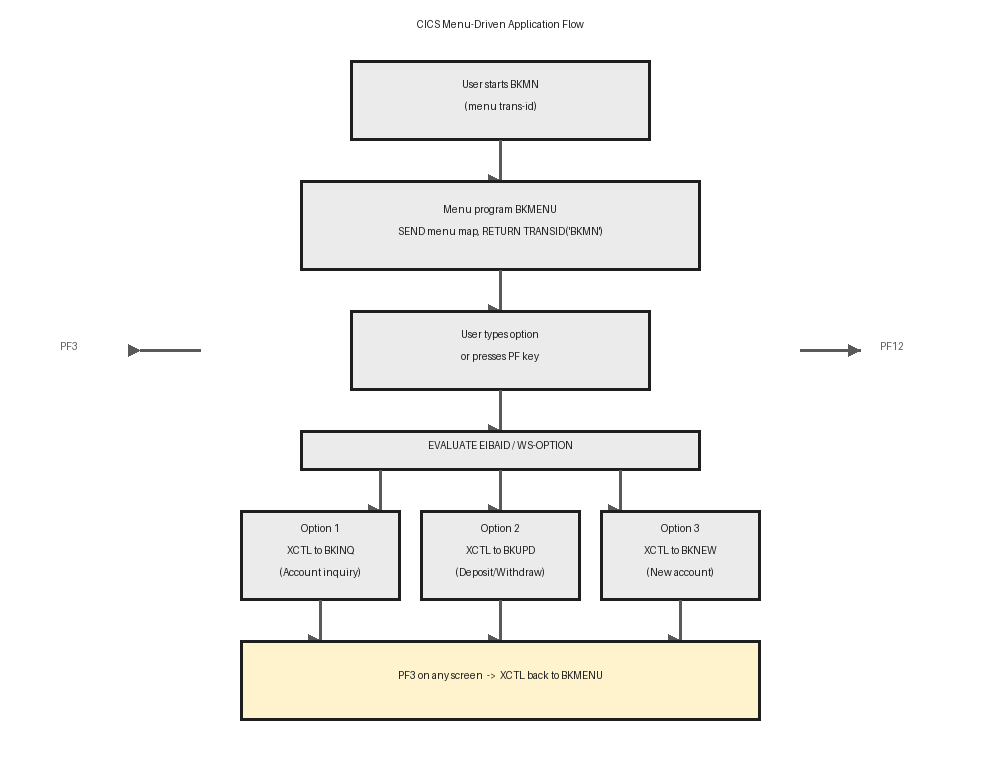
- The menu program is the entry point of the application, with a trans-id like BKMN or INVMENU.
- It displays numbered options (1 = Inquiry, 2 = Update, 3 = New account) plus instructions for PF keys.
- The user types a choice and presses Enter; the program validates it and XCTLs to the selected program.
- The menu program never updates files itself - it only routes control.
- Navigation stays consistent everywhere: PF3 always means back to the menu, PF12 cancels the current screen.
Handling the user choice with AID keys
- EIBAID tells which key was pressed: DFHENTER, DFHPF3, DFHPF12 and so on.
- Use EVALUATE on EIBAID: Enter processes the typed option, PF3 exits, other keys show an error.
- Read the option field from the symbolic map and check it is within the valid range.
- An invalid choice redisplays the menu with an error message - it must never abend.
- Pass shared context such as user id or branch code in the COMMAREA so every program knows who is signed on.
- Example:-
EVALUATE EIBAID WHEN DFHENTER PERFORM 2000-PROCESS-OPTION WHEN DFHPF3 EXEC CICS XCTL PROGRAM('SIGNOFF') END-EXEC WHEN DFHPF12 MOVE 'REQUEST CANCELLED' TO MSGO WHEN OTHER MOVE 'INVALID KEY PRESSED' TO MSGO END-EVALUATE.
Navigation rules used in real projects
- Every application screen supports PF3 back to the menu - code it in each program, not just the menu.
- PF12 cancels the current operation: on a key map it returns to the menu, on a data map it redisplays the key map.
- Keep the menu map simple: few fields, clear numbering, and the cursor positioned in the option field.
- Log the selected option and user id to a TD queue for a simple audit trail.
- The diagram below shows how the menu program routes control between the banking transactions.