
 Mainframe Tutorial
 JCL Tutorial
 Introduction
 Mainframe Interview Q&A
 Mainframe Quiz
 Mainframe Memes
 Contact us
 About us
Module 2: DB2 Architecture
 Backward

DB2 Architecture
DB2 is a relational database management system from IBM that runs on the mainframe (z/OS). The DB2 architecture is made up of one subsystem plus several address spaces, buffer pools, logs and a catalog. This page gives you the big picture before we study each part in detail.
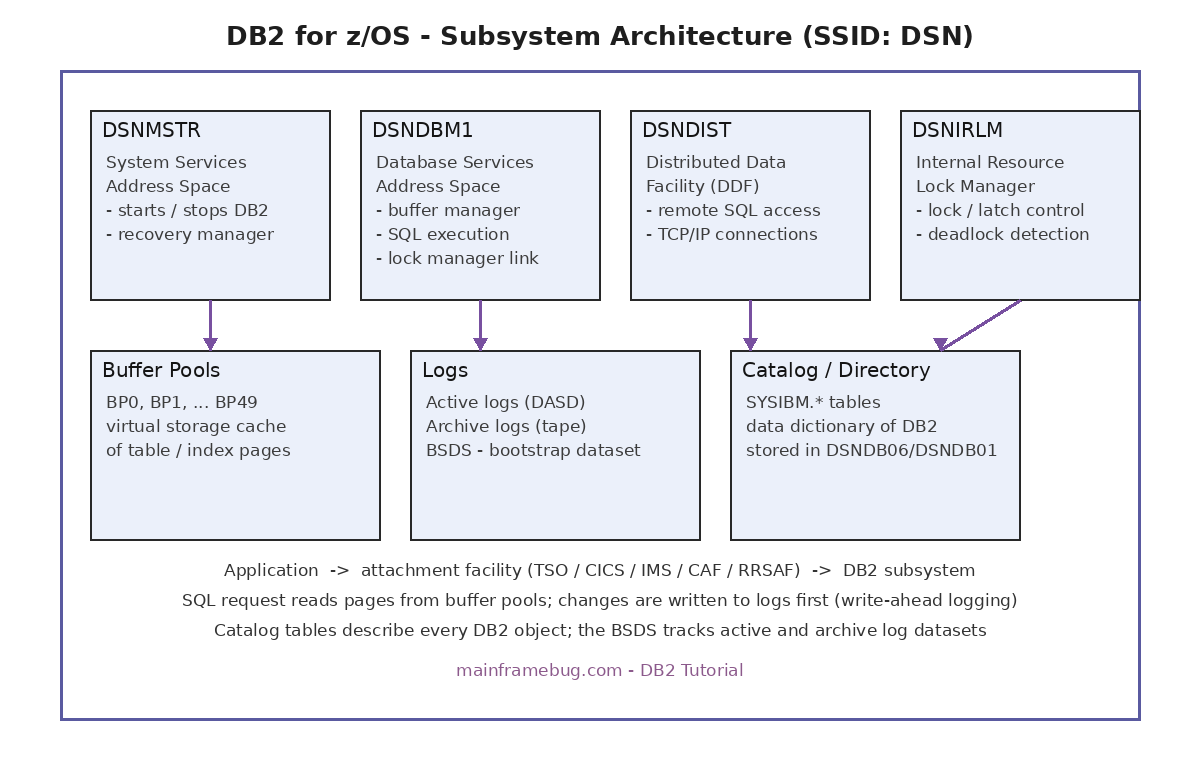
Parts of DB2 architecture
- DB2 subsystem - A running copy of DB2 on the mainframe. It is identified by a short name called the SSID (for example DSN). One subsystem is one DB2.
- Address spaces - The subsystem runs as four z/OS address spaces: DSNMSTR (system services), DSNDBM1 (database services), DSNDIST (distributed data) and DSNIRLM (lock manager). Each has one job to do.
- Buffer pools - Virtual storage areas where DB2 keeps copies of table and index pages. Reading from memory is much faster than reading from disk.
- Logs - Every change made to data is first recorded in the active log. When an active log fills up, DB2 copies it to an archive log. Logs make recovery possible.
- Catalog and directory - Special DB2 tables (SYSIBM.*) that describe every database, table, index and view. DB2 itself is the only writer allowed to update them.
How a SQL request flows through DB2
- Step 1 - Your program (COBOL batch, CICS or TSO) calls DB2 through an attachment facility like CAF or RRSAF.
- Step 2 - DB2 finds the table description in the catalog and decides how to get the rows (this plan was fixed at bind time).
- Step 3 - DB2 looks for the data page in a buffer pool first. If it is not there, it reads it from DASD into the pool.
- Step 4 - For INSERT, UPDATE or DELETE, DB2 writes the change to the log first (write-ahead logging), then updates the buffer pool page.
- Step 5 - At COMMIT, the log records are forced to disk. The actual data pages can be written later, because the log can rebuild them.
DB2 commands - first look
- DB2 is controlled with commands that start with a hyphen. You can run them from SPUFI (option 7 DB2 COMMANDS) or the z/OS console.
- Example:--DISPLAY DB2 -DISPLAY THREAD(*) -DISPLAY BUFFERPOOL(ACTIVE)
- -DISPLAY DB2 shows the subsystem name, status and DB2 version. -DISPLAY THREAD(*) shows all active application threads.