
 Mainframe Tutorial
 JCL Tutorial
 Introduction
 Mainframe Interview Q&A
 Mainframe Quiz
 Mainframe Memes
 Contact us
 About us
Module 3: IMS Segments
 Backward

IMS- Segments
A segment is the smallest unit of data DL/I can retrieve: roughly the IMS equivalent of a record. Segments are typed (STUDENT, COURSE, GRADE), and each type has a fixed layout. Understanding segment types, keys and parent-child rules is the foundation for writing correct DL/I calls.
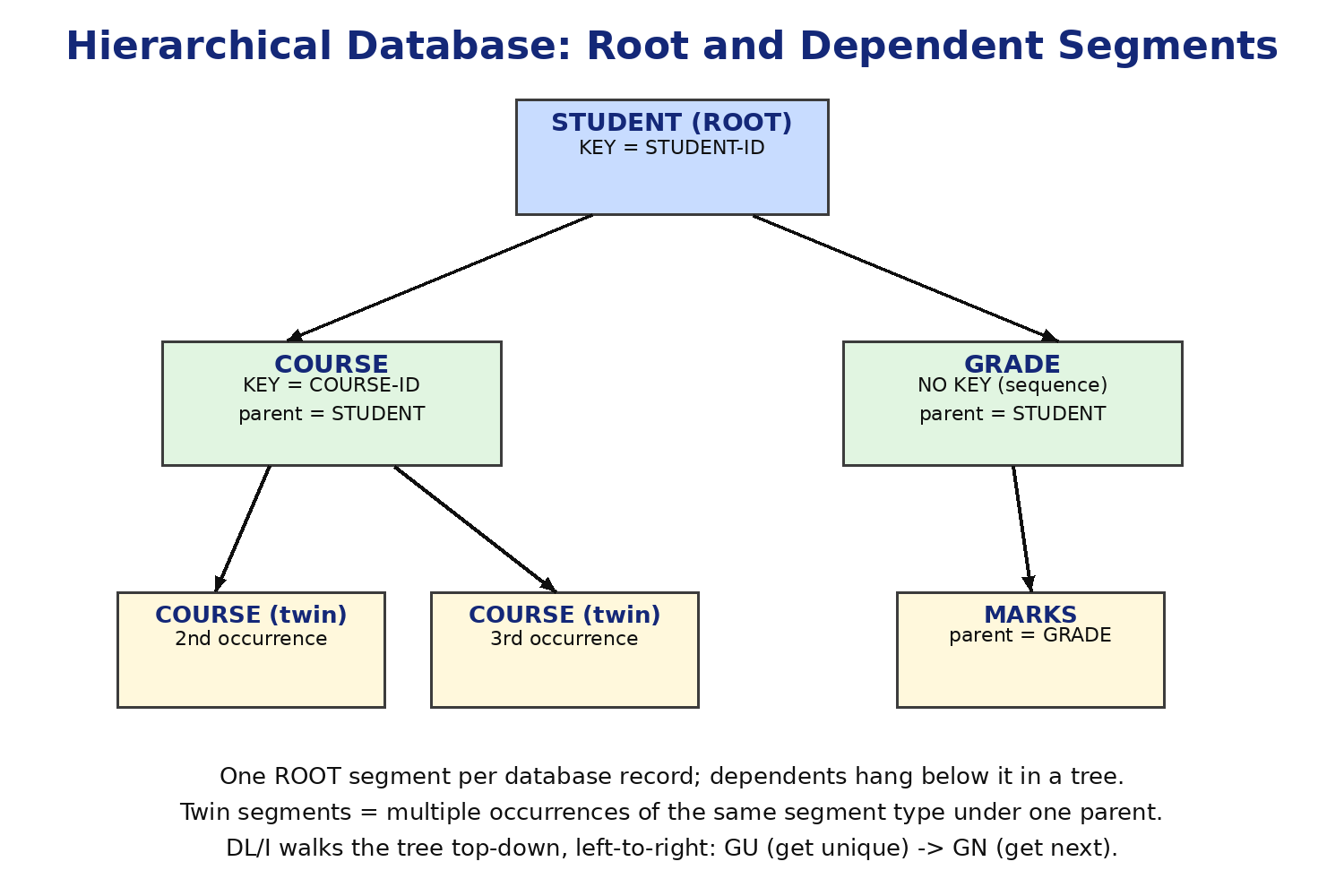
Segment types: root, dependent, twin
- Root segment: the top of the hierarchy. There is exactly one root segment type per database, and one root occurrence per database record.
- Dependent segment: any segment below the root. A dependent has exactly one parent segment type, but a parent can have many dependent types beneath it.
- Twin segments: multiple occurrences of the same segment type under one parent occurrence. Three COURSE segments under one STUDENT are twins.
- DL/I always walks the tree top-down, left-to-right: root first, then each dependent subtree in order.
Keys: sequence fields and search fields
- A sequence field (SEQ) orders the occurrences of a segment type under their parent, e.g. COURSEID orders COURSE twins.
- SEQ,U means the sequence field must be unique among twins; SEQ,M allows duplicates.
- A segment type can also have search fields: non-key fields you can still qualify in an SSA, though access is slower than by sequence field.
- The concatenated key of a segment is the chain of sequence fields from the root down to it (STUDID + COURSEID + GRADE...). IMS can return it in the key feedback area of the PCB.
Parent-child rules
- Every dependent occurrence must have a parent occurrence; IMS will not store an orphan.
- Insert rule decides where a new twin goes: FIRST (at the front), LAST (at the end) or HERE (after current position).
- Delete rule decides what happens to dependents when a parent is deleted: PHYSICAL (dependents deleted too), LOGICAL (dependents stay but are unreachable), VIRTUAL (both rules combined in logical databases).
- Insert and delete rules are coded in the DBD as RULES=(insert-rule,delete-rule), for example RULES=(L,L).
DBDGEN: defining the database
- The DBD is coded with assembler-like macros and assembled by the DBDGEN utility. Below is a real DBD for a student database with STUDENT root, COURSE dependent and GRADE dependent.
PRINT NOGEN
DBD NAME=STUDDBD,ACCESS=(HIDAM,VSAM)
DATASET DD1=STUDDD1,DEVICE=3390
SEGM NAME=STUDENT,BYTES=40,PTR=T,RULES=(L,L)
FIELD NAME=(STUDID,SEQ,U),BYTES=10,START=1,TYPE=C
FIELD NAME=STUDNAME,BYTES=30,START=11,TYPE=C
SEGM NAME=COURSE,PARENT=STUDENT,BYTES=38,PTR=T,RULES=(L,L)
FIELD NAME=(COURSEID,SEQ,U),BYTES=8,START=1,TYPE=C
FIELD NAME=COURSENAME,BYTES=30,START=9,TYPE=C
SEGM NAME=GRADE,PARENT=COURSE,BYTES=12,PTR=T
FIELD NAME=SEMESTER,BYTES=6,START=1,TYPE=C
FIELD NAME=MARKS,BYTES=3,START=7,TYPE=C
DBDGEN
FINISH
END
DBD NAME=STUDDBD,ACCESS=(HIDAM,VSAM)
DATASET DD1=STUDDD1,DEVICE=3390
SEGM NAME=STUDENT,BYTES=40,PTR=T,RULES=(L,L)
FIELD NAME=(STUDID,SEQ,U),BYTES=10,START=1,TYPE=C
FIELD NAME=STUDNAME,BYTES=30,START=11,TYPE=C
SEGM NAME=COURSE,PARENT=STUDENT,BYTES=38,PTR=T,RULES=(L,L)
FIELD NAME=(COURSEID,SEQ,U),BYTES=8,START=1,TYPE=C
FIELD NAME=COURSENAME,BYTES=30,START=9,TYPE=C
SEGM NAME=GRADE,PARENT=COURSE,BYTES=12,PTR=T
FIELD NAME=SEMESTER,BYTES=6,START=1,TYPE=C
FIELD NAME=MARKS,BYTES=3,START=7,TYPE=C
DBDGEN
FINISH
END
- DBD: names the database (STUDDBD) and its access method (HIDAM on VSAM).
- DATASET: ties the DBD to a DD name used in execution JCL.
- SEGM: defines a segment type. PARENT= names the parent type (omitted for the root). BYTES= is the segment length. PTR=T builds twin forward pointers.
- FIELD: defines fields inside the segment. NAME=(STUDID,SEQ,U) makes STUDID the unique sequence field; START= is the byte offset; TYPE=C is character data.
- DBDGEN / FINISH: generate the control blocks and end the assembly.
Segment layout vs COBOL copybook
- The COBOL I/O area for a segment must match the DBD field layout byte for byte. For STUDENT above:
01 STUDENT-IO-AREA.
05 STUDID PIC X(10).
05 STUDNAME PIC X(30).
05 STUDID PIC X(10).
05 STUDNAME PIC X(30).
- If the copybook is shorter than BYTES=, IMS pads; if longer, data is truncated or the call fails. Keep them in sync.
- Generate or hand-maintain one copybook per segment and share it across programs to avoid drift.