
 Mainframe Tutorial
 JCL Tutorial
 Introduction
 Mainframe Interview Q&A
 Mainframe Quiz
 Mainframe Memes
 Contact us
 About us
Module 3: REXX PARSE, DO, IF and SELECT
 Backward

REXX- PARSE, DO, IF and SELECT
PARSE is the instruction that made REXX famous: one line can split a record by column positions or by delimiters. Combined with DO loops and IF/SELECT decisions, it handles most of the text-processing work you will ever do on the mainframe. Every example on this page is runnable TSO/E REXX.
How PARSE works
- PARSE takes a source string and a template describing how to split it into variables.
- The template has two kinds of patterns: positional (column numbers) and string patterns (literal delimiters).
- Parsing is always left to right. Each variable receives the text up to the next pattern.
- A period . in a template is a placeholder - it throws that piece away.
Positional templates
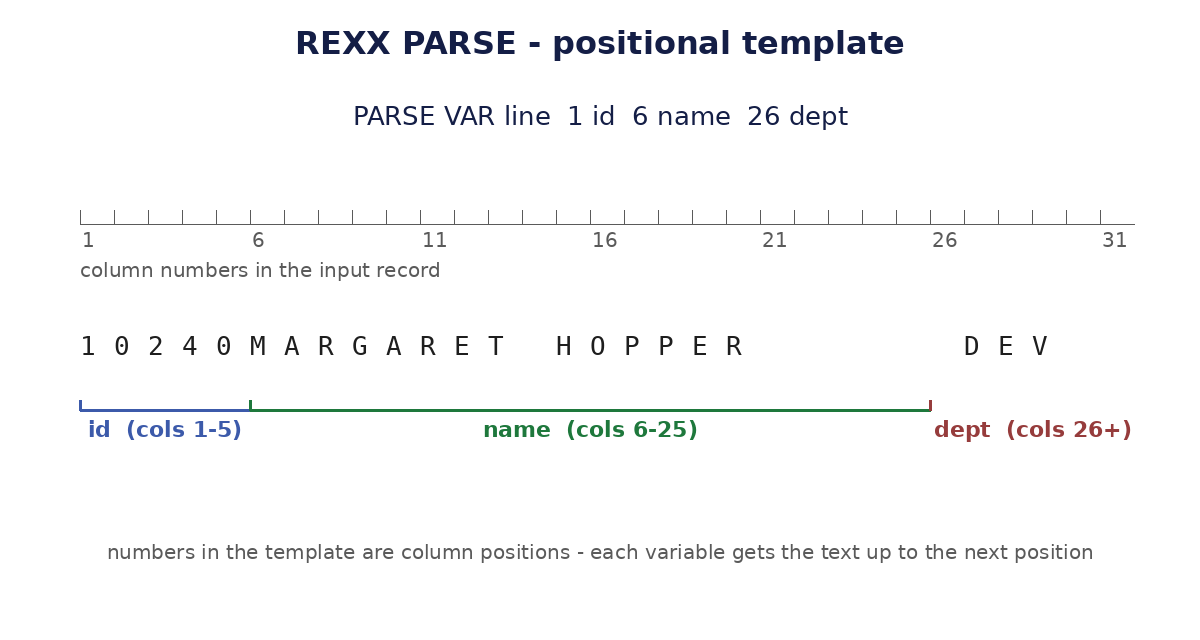
- A number in the template is an absolute column position, not a length. 6 name means "name starts at column 6".
- Each variable gets the text from its position up to the next position in the template.
- The last variable gets everything from its position to the end of the string.
/* REXX */
line = '10240MARGARET HOPPER DEV'
PARSE VAR line 1 id 6 name 26 dept
SAY 'ID =' id /* 10240 */
SAY 'NAME=' STRIP(name) /* MARGARET HOPPER */
SAY 'DEPT=' dept /* DEV */
Pattern (delimiter) templates
- A quoted string in the template is a literal pattern: parsing stops at that delimiter and the variable gets the text before it.
- This is the easiest way to split comma-separated or blank-separated data.
- Unquoted words in the template split on blanks, one word per variable.
/* REXX */
line = 'SMITH,JOHN,DEV,75000'
PARSE VAR line lname ',' fname ',' dept ',' salary
SAY fname lname 'works in' dept 'earning' salary
/* JOHN SMITH works in DEV earning 75000 */
line2 = 'alpha beta gamma delta'
PARSE VAR line2 w1 w2 . w4
SAY w1 w2 w4 /* alpha beta delta (. skipped gamma) */
PARSE variants: ARG, PULL, VAR, VALUE, SOURCE
- PARSE ARG - parse the parameters passed to the exec, preserving case (plain ARG uppercases).
- PARSE PULL - read a terminal/stack line without uppercasing it.
- PARSE VAR name - parse the value of a variable (shown above).
- PARSE VALUE expr WITH template - parse any expression, for example a function result.
- PARSE SOURCE - information about the environment; the first token is the language name.
/* REXX */
PARSE VALUE DATE('S') WITH yyyy 5 mm 7 dd
SAY 'Year:' yyyy 'Month:' mm 'Day:' dd
/* Year: 2026 Month: 10 Day: 08 */
PARSE SOURCE language .
SAY 'Language:' language /* Language: REXX */
DO loops
- DO n repeats n times. DO i = 1 TO 10 BY 2 is the classic counted loop.
- DO WHILE condition tests before each pass; DO UNTIL condition tests after, so it always runs at least once.
- DO FOREVER loops until you LEAVE it - always give it an exit path.
- LEAVE exits the innermost loop; ITERATE skips to the next pass.
- Every DO needs a matching END. You can name it: END i.
/* REXX */
DO i = 1 TO 5
SAY 'Count:' i
END
DO n = 10 TO 1 BY -2
SAY n
END
/* 10, 8, 6, 4, 2 */
total = 0
DO FOREVER
PULL num
IF num = '' THEN LEAVE
total = total + num
END
SAY 'Total:' total
IF / THEN / ELSE
- IF condition THEN instruction - the workhorse decision. ELSE is optional.
- For several instructions, group them in a DO ... END block after THEN or ELSE.
- ELSE always pairs with the nearest IF, so use DO/END blocks when nesting.
- Comparisons: = \= > < >= <= (numeric when both sides are numbers), == \== for strict character comparison.
/* REXX */
salary = 75000
IF salary > 50000 THEN
SAY 'High earner'
ELSE
SAY 'Standard'
dept = 'DEV'
IF dept = 'DEV' THEN DO
SAY 'Developer'
SAY 'Gets a bonus'
END
ELSE SAY 'Not in development'
SELECT / WHEN / OTHERWISE
- SELECT tests a list of WHEN conditions from top to bottom; the first true one runs.
- OTHERWISE catches everything else - always code it so silent no-matches cannot hide bugs.
- SELECT ends with END. It replaces long IF/ELSE IF chains and is much easier to read.
/* REXX */
PULL dept
SELECT
WHEN dept = 'DEV' THEN SAY 'Development team'
WHEN dept = 'OPS' THEN SAY 'Operations team'
WHEN dept = 'DBA' THEN SAY 'Database team'
OTHERWISE SAY 'Unknown department:' dept
END