
 Mainframe Tutorial
 JCL Tutorial
 Introduction
 Mainframe Interview Q&A
 Mainframe Quiz
 Mainframe Memes
 Contact us
 About us
Module 1: REXX Introduction
 Backward

REXX- Introduction
REXX is the scripting language of the mainframe. When you need to automate a repetitive TSO task, parse a dataset, or glue JCL steps together, REXX is usually the fastest tool for the job. It is interpreted, so there is no compile step - you write an exec, run it, and see the result immediately.
This module introduces what REXX is, where it runs on z/OS, and how to run your first exec both in a TSO session and in batch JCL.
What is REXX
- REXX stands for REstructured eXtended eXecutor. It was designed by Mike Cowlishaw at IBM in 1979 and became an SAA procedural language.
- It is an interpreted, typeless, free-form language - you never declare variables or their types.
- A REXX program is called an exec. It is stored as a member of a partitioned dataset (PDS), typically with RECFM FB and LRECL 80.
- REXX is the natural successor to CLIST on TSO/E and is far more powerful for string handling and arithmetic.
- The same exec can run in a TSO session, in batch JCL, inside ISPF, and from system automation products.
Key characteristics of REXX
- No declarations: variables spring into existence on first assignment and can hold a number or a string at any time.
- Superb string parsing: the PARSE instruction can split records by position or by delimiter in a single line.
- About 70 built-in functions for string, word, arithmetic, date/time, and conversion work.
- Host command interface: any line that is not a REXX instruction is sent to the host environment (TSO/E by default), so TSO commands like ALLOCATE and EXECIO run directly inside your exec.
- Simple I/O: SAY writes a line, PULL reads a line, ARG reads the parameters passed to the exec.
- Readable syntax: DO/END, IF/THEN/ELSE, SELECT/WHEN - code reads almost like English.
Where REXX runs on z/OS
- TSO/E foreground: interactive execs at the READY prompt or from ISPF option 6.
- Batch JCL: via the IRXJCL program - the standard way to run REXX in production jobs.
- ISPF applications: panel logic, skeletons, and edit macros are routinely written in REXX.
- System automation: products like NetView and SA z/OS use REXX for automation scripts.
- DB2: REXX can even be used for DB2 stored procedures and for driving SQL through host commands.
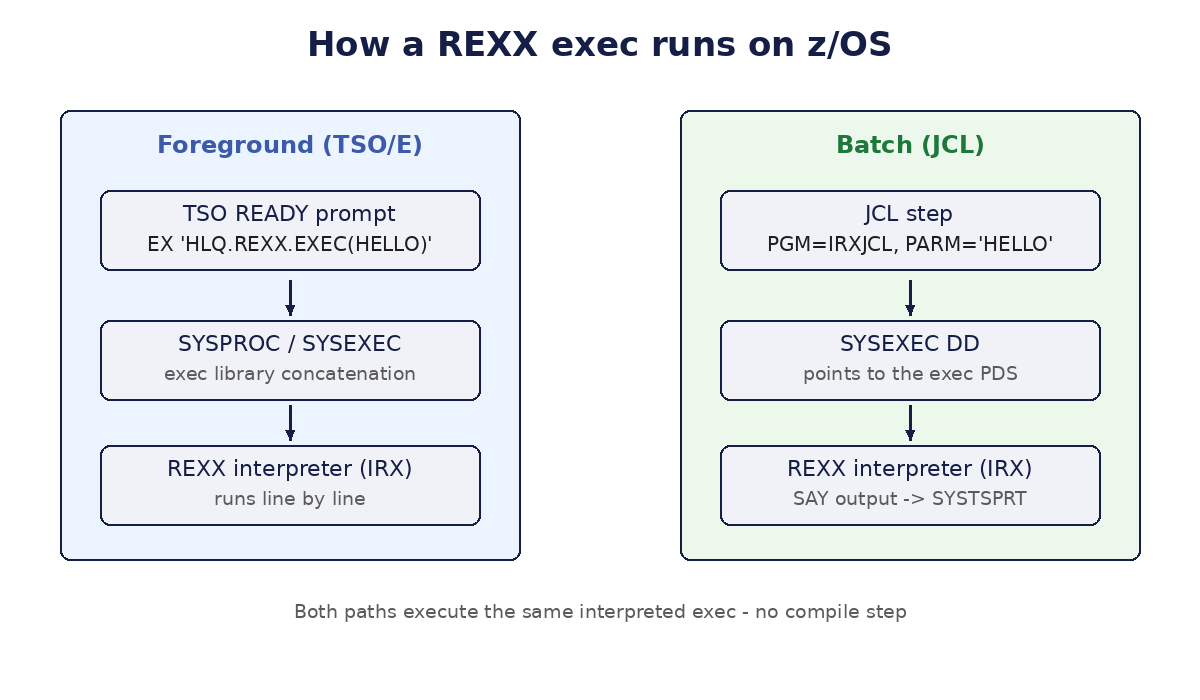
Running a REXX exec in TSO/E
- Save your exec as a member of a PDS, for example HLQ.REXX.EXEC(HELLO).
- At the TSO READY prompt (or ISPF option 6), run it with the EXEC command:
EX 'HLQ.REXX.EXEC(HELLO)' EXEC
- If the PDS is in your SYSPROC or SYSEXEC concatenation, you can just type %HELLO or EX HELLO.
- The EXEC keyword tells TSO the member is a REXX exec rather than a CLIST.
- Use the ALTLIB command to add your exec library to the search order without a logon proc change, for example: ALTLIB ACTIVATE APPLICATION(EXEC) DATASET('HLQ.REXX.EXEC').
Running REXX in batch with IRXJCL
In batch, the program IRXJCL is the REXX interpreter. The member name goes in PARM (maximum 8 characters), the exec PDS goes in the SYSEXEC DD, and SAY output goes to SYSTSPRT.
//RUNREXX JOB (ACCT),'REXX BATCH',CLASS=A,MSGCLASS=X
//STEP1 EXEC PGM=IRXJCL,PARM='HELLO'
//SYSEXEC DD DSN=HLQ.REXX.EXEC,DISP=SHR
//SYSTSPRT DD SYSOUT=*
//SYSTSIN DD DUMMY
- PARM='HELLO' names the exec member to run. It must be 8 characters or fewer.
- SYSEXEC DD points to the PDS that holds the exec. You can concatenate several PDSs here.
- SYSTSPRT DD receives everything the exec writes with SAY.
- SYSTSIN DD DUMMY satisfies the TSO input requirement; PULL in batch reads from SYSTSIN if you give it real input.
- The job's return code is the return code your exec sets with EXIT or RETURN.
Your first REXX program
Create member HELLO in your exec PDS with these three lines. The first line is a comment that by convention identifies the member as REXX.
/* REXX - my first exec */
SAY 'Hello, mainframe world!'
EXIT 0
- /* ... */ is the REXX comment. Starting an exec with /* REXX */ is the universal convention.
- SAY writes text to the terminal (or to SYSTSPRT in batch).
- Run it in TSO with EX 'HLQ.REXX.EXEC(HELLO)' EXEC and you will see Hello, mainframe world!.
- EXIT 0 ends the exec and sets return code 0. Without EXIT, REXX simply ends at the last line.
